Why Car Key Types Matter Before You Need a Replacement
The single most useful thing you can know about your car key is what kind it is. The type determines whether a replacement can be cut quickly, whether it has to be electronically programmed to your specific vehicle, and what equipment is required to make it work. Two cars sitting side by side in a parking lot can need very different processes for the same task.
Knowing your key type also helps you avoid surprises. A lost key for an older vehicle is often a straightforward cut. A lost key for a newer vehicle usually involves pairing a chip or fob to the car's computer so the engine will start. Understanding the difference up front means you can ask the right questions and plan for the right kind of help.
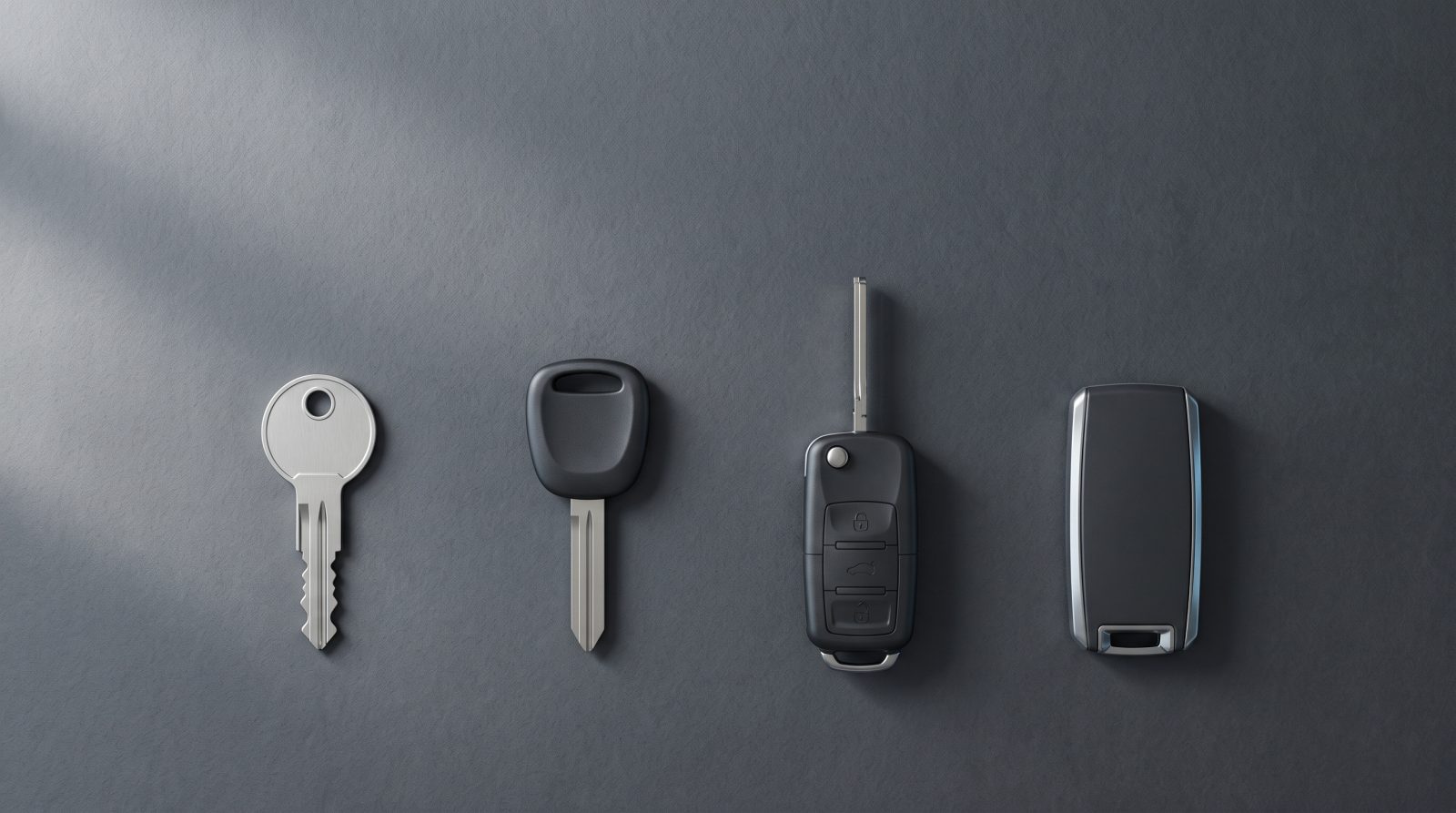
The four types below cover the vast majority of passenger vehicles on the road today. Most cars use one of them, and many drivers genuinely do not know which one is in their pocket until something goes wrong.
- Older vehicles often use a basic metal key with no electronics
- Most cars from the late 1990s onward use a chip for anti-theft
- Many mid-2000s and newer cars combine the key and the remote
- Recent vehicles frequently use a keyless smart/proximity fob
Metal Keys (Mechanical Keys)
The metal key is the original car key: a cut blade of metal that physically turns in the door lock and ignition. There is no battery, no chip, and no electronics. If the cuts match the lock's pins, the key works. These are most common on vehicles built before the late 1990s, plus some entry-level models and certain motorcycles and trailers afterward.
Because a metal key carries no electronic component, a duplicate can usually be made by matching the cuts to your existing key or by reading the lock. It is the simplest key to replace. The trade-off is security: a purely mechanical key offers no electronic barrier against someone starting the car if they can copy the blade.
If you have an older vehicle and the key is a flat piece of metal with a simple looped head and no buttons or black plastic housing holding a chip, you are almost certainly dealing with a mechanical key.
- No battery and no electronic chip inside
- Works by matching cut pattern to the lock cylinder
- The simplest key to duplicate
- Common on vehicles built before roughly the late 1990s
Transponder Keys (Chip Keys)
A transponder key looks like a normal cut key but has a small electronic chip embedded in the plastic head. When you insert the key and turn it, the car sends out a signal and the chip answers with a unique code. If the code matches what the vehicle expects, the engine is allowed to start. If it does not match, the car may crank but will not run. This system, sometimes called an immobilizer, became standard on most vehicles starting in the late 1990s.
Because of that chip, a transponder key cannot simply be cut and used. The blade has to be cut to fit the lock, and the chip has to be electronically programmed to your specific vehicle so the immobilizer recognizes it. Cutting alone gets you a key that turns but will not start the engine, which is a common point of confusion for people who try to copy a chip key at a hardware kiosk.
The upside of a transponder key is meaningful theft protection: a copied blade is useless without the matching programmed chip. If you have a key with a thicker plastic head and no buttons, but your car is from roughly 1998 onward, there is a good chance there is a chip inside even if you cannot see it.
- Looks like a metal key but has a hidden anti-theft chip
- Must be both cut and electronically programmed to start the car
- Provides real protection against simple key copying
- Standard on most vehicles from the late 1990s forward
Remote-Head Keys and Smart (Proximity) Keys
A remote-head key combines a cut, chipped key with a built-in remote: the key blade and the lock/unlock buttons live in one molded unit. This is the familiar plastic-headed key with buttons that you still insert and turn to start the car. Because it contains a transponder chip, it needs programming like any chip key, and the remote functions are paired to the vehicle as well. Some remote-head keys also hide a thin emergency metal blade inside for manual door access.
A smart key, also called a proximity key or keyless fob, takes a different approach. You keep the fob in your pocket or bag, the car detects it nearby, and you start the engine with a push button instead of turning a key. There is usually no blade you insert at all, though most smart fobs hide a small mechanical emergency key inside for opening a door if the fob battery dies. These systems are common on many newer vehicles and rely on encrypted, rolling signals that change each use for stronger security.
Both of these types are more involved to replace than a plain metal key. The fob has to be matched to your vehicle's electronics, and the process and equipment vary by make and model. A weak or dead fob battery can also mimic a lost-key situation, so a fading remote is sometimes a simpler fix than people expect. If you are not sure which you have, the quickest tell is whether you insert and turn a key (remote-head) or simply carry the fob and push a start button (smart key).
- Remote-head keys merge the chipped key and remote into one unit
- Smart keys let you start the car without inserting a key
- Most smart fobs hide an emergency mechanical blade inside
- Both require pairing to the vehicle, which varies by make and model
How to Identify Your Car Key and What to Do Next
You can usually narrow down your key type in a few seconds. Look at the head of the key first. A simple metal loop with a flat blade and no plastic housing points to a mechanical key. A thicker plastic head with no buttons, on a vehicle from the late 1990s onward, usually means a transponder chip is inside. Buttons plus a blade you insert and turn means a remote-head key. No blade and a push-button start means a smart proximity fob.
When you need a copy or a replacement, a few details make the job go smoothly: your vehicle's year, make, and model, and proof that the car is yours. Proof of ownership is required before service, so having your registration or title and a matching ID ready helps everything move faster. If you still have a working key, bring it; many programming jobs are simpler when at least one original key is on hand.
Because chip, remote-head, and smart keys all need programming, a replacement is more than a simple cut, and a mobile auto locksmith can handle the cutting and programming at your location for many vehicles. If you are in San Francisco or the surrounding corridor of Oakland, Hayward, San Mateo, Fremont, or San Jose and need car key replacement, key fob and transponder programming, or help with a lockout, call Auto Locksmith San Francisco at (415) 943-3009 with your vehicle details ready.
If your vehicle was built from roughly the late 1990s onward, it very likely has a transponder chip even if you cannot see it. The chip sits hidden inside the plastic head of the key. A telltale sign is that a key copied only by cutting will turn the ignition but will not start the engine, because the chip must also be programmed to your specific vehicle.
A remote-head key has buttons plus a metal blade you still insert and turn to start the car. A smart key, or proximity fob, has no blade you insert; you keep it on you, the car detects it, and you start the engine with a push button. Most smart fobs do hide a small emergency mechanical key inside for opening a door if the battery dies.
Kiosks and basic cutting machines can duplicate the metal blade, but they cannot program the electronic chip or pair a remote or smart fob to your vehicle. Transponder, remote-head, and smart keys must be matched to the car's anti-theft system to actually start the engine, which requires the right equipment for your make and model. For those, call Auto Locksmith San Francisco at (415) 943-3009.
Need an auto locksmith now: (415) 943-3009
Have your location, vehicle year, make, model, key type if known, and proof of ownership ready.
- Check the key head: blade only, chip head, buttons, or no blade
- Match the clue to your vehicle's age to confirm the type
- Have year, make, model, and proof of ownership ready
- Bring a working key if you have one to ease programming